
Skip to content
StripBoard

Shooting plans and production documents

From production materials to a finished plan.

01 · Materials

Bring what you already have.

Storyboard PDFs, DOCX treatments, XLSX lists and photos. Images are extracted in your browser.

02 · Library

Every frame gets a caption.

Captions and categories are suggested from the text next to each image — you approve them. Then you assign a frame to a shot.

03 · Shooting plan

Images, shots and times in one place.

Blocks take the project's colours, and storyboards can be as large as the day needs.

04 · Time

One shot runs longer. The day recalculates.

Every following time moves on its own. An anchored lunch stays put and the overlap is flagged — you decide. FOTO and DIGITAL run in parallel as sub-blocks.

05 · Your document

Same plan. Your visual language.

Colours, fonts, image sizes, logo layout and page background — then a PDF that is readable on a phone and on paper.

06 · Production · Premium

The callsheet lives in the same project.

Dates, key times and the location are read from the same shooting day. Changes from the plan are taken over deliberately: the callsheet lists each difference as “current / from plan”.

07 · Day package

Cover, callsheet and shoot order in one PDF.

Numbered across the whole package, in the project's colours. The shoot order always comes last, on its own pages.
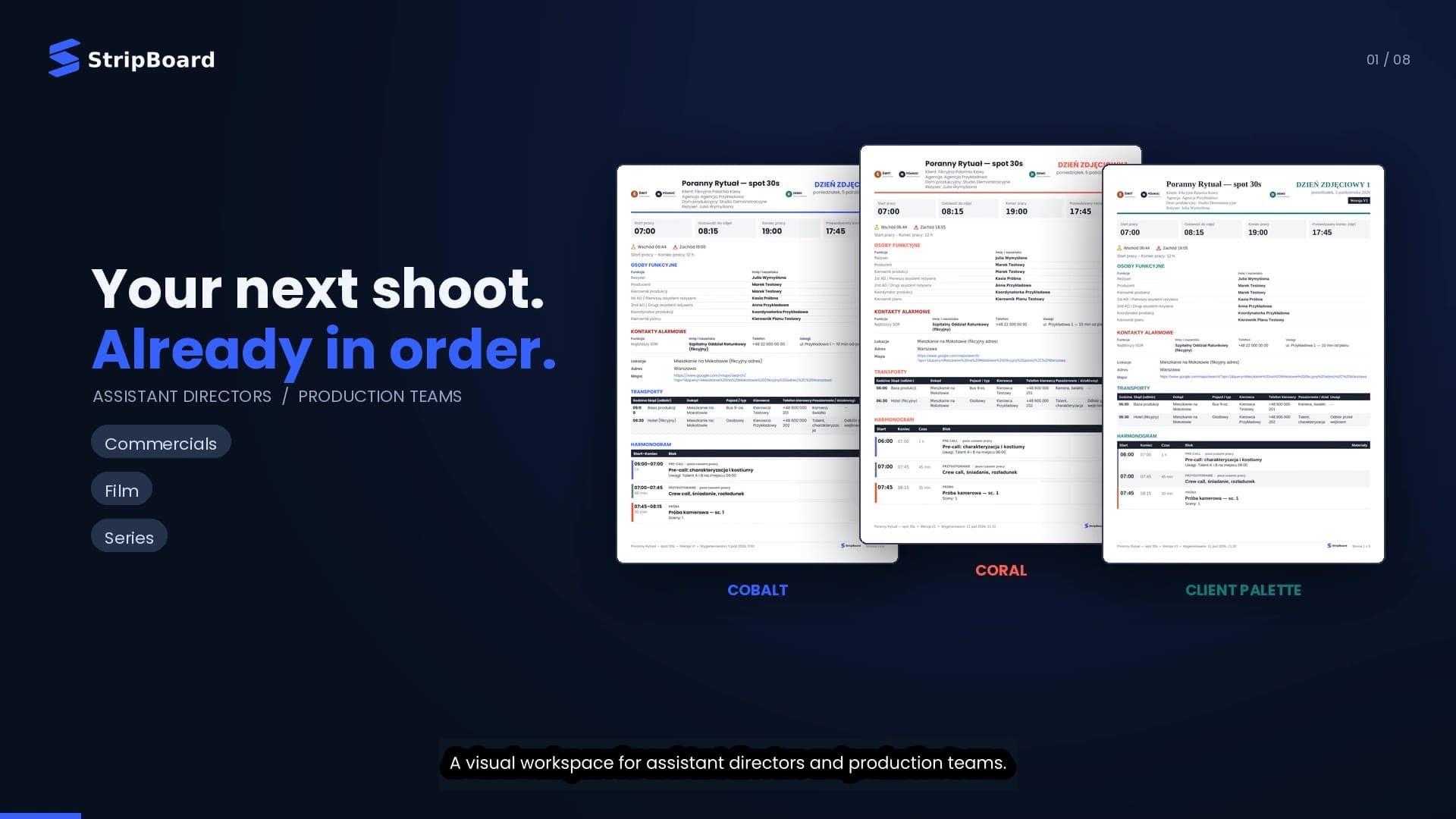

Your plan. Your visual language.

Same day. Five documents.

Each page below was exported by the current app from the same synthetic shooting day — only the presentation settings change.

Colour
Cobalt
Font
DejaVu Sans Condensed
Storyboards
Medium
Header
Classic, three logos
Background
White

What you can personalise

  • Main colour, block-type colours and text contrast checked against WCAG
  • Four font families for document, headings and schedule
  • Storyboard size per block or per day, frame labels A/B/C or 1/2/3
  • Header layouts and up to three logos — client, agency, production
  • Page backgrounds with a separate white print profile
  • Section order and visibility: key times, contacts, locations, transport, notes

Classic

Product film

45 seconds with StripBoard.

From references to the shooting order, the callsheet and the PDF package — in under a minute. English voice-over with on-screen subtitles.

Plays with sound (English voice-over) — you can mute it in the player.

Who it's for

Made for the people who run the day.

  1. 01

    1st & 2nd assistant directors

    • Build the day with the storyboard in front of you, not in another tab.
    • Change a duration and the rest of the day recalculates — overtime included.
  2. 02

    Production managers & coordinators

    • Callsheet, crew list and transport built on the AD's plan.
    • One numbered day package instead of separate attachments.
  3. 03

    Producers

    • Documents in your company's colours, fonts and logos — every project, same standard.
    • Version history per day: what went out, and when.
  4. 04

    Commercials, film and series

    • Multi-day projects, shoot orders with parallel FOTO and DIGITAL activities.
    • Plans and callsheets in English or Polish.
  5. 05

    Virtual production & mocap teams

    • A role catalogue with VP, motion capture, facial capture and tracking departments.
    • Your own roles and departments, saved for the next project.

Pricing

Free during testing.

StripBoard is free during the testing period. Paid plans will launch later — we will announce them in advance, and moving to a paid plan will be your decision.

Planning

Standard

Freeduring testing

Everything for planning: library, visual shooting plan, versions and PDF plans.

Full access: planning and Production

Premium

Freeduring testing

Everything in Standard plus the Production module: callsheet, crew, casting, transport and the day package.

For production companies

Company

Individual offer

Several people in one organisation. Terms agreed individually.

Testing period: create an account and use the app at no cost. No one will be charged without your consent.

You create your account in the app — the same account stays with you after the testing period.

Compare plans
FeatureStandardPremiumCompany
Projects and production calendar with .ics export
Material import (PDF, DOCX, XLSX, images) and library
Visual shoot order with recalculated times
Parallel activities (FOTO, DIGITAL) and conflict warnings
Document personalisation and versioned PDF export
Project file export and import
Callsheet editor and PDFNot included
Crew list, casting and talentNot included
Transport plansNot included
Production materials, cover design and day packageNot included
Several users in one organisationNot includedNot included

Where StripBoard is today

Available in the app

  • Planning: library, shoot order, recalculation, personalisation, PDF
  • Production module (Premium): callsheet, crew, casting, transport, materials, day package
  • Web app that can be installed on your device (PWA)

Not available yet

  • Shared cloud workspace for teams
  • AI-assisted document analysis
  • Native desktop and mobile apps

Where it runs

In your browser. Or installed.

iPhoneiPadComputerWeb browserInstall as web app

Web app

Chrome, Edge, Safari and Firefox on a computer, tablet or phone.

Open the app

iPhone, iPad and computer

In Safari tap Share → “Add to Home Screen”: StripBoard opens full screen from its own icon, no App Store needed. On a computer install it from Chrome, Edge or Safari.

Install on iPhone & iPad

Native apps

  • macOSNot available yet
  • WindowsNot available yet
  • iPhone & iPadNot available yet
  • AndroidNot available yet

For companies

Several people, one production company?

Tell us about your team. We'll prepare an offer for the number of seats you need.

What do you need?
0/2000

Your data is controlled by Jakub Mączka Production (Omka Production), al. Jana Pawła II 27, 00-867 Warsaw, Poland. We use it to reply to your message and prepare an offer. Details and your rights: Privacy policy

FAQ

Questions, answered plainly.

Who is StripBoard for?

First and second assistant directors, schedule makers, production managers, producers and production companies working on commercials, film and series — including virtual production and mocap teams. Standard covers the AD's day; Premium adds the documents the production office sends around it.

What's the difference between the shoot order and the callsheet?

The shoot order (work plan) is the visual sequence of the day: blocks, times, storyboards, set-ups, meals and wrap. The callsheet tells people where and when to be: key times, location, hospital and safety, department calls, cast and contacts. In StripBoard both read the same shooting day; the callsheet shows differences from the plan and lets you decide what to take over.

How far can I personalise the PDF?

Main and block-type colours, four font families, header layouts with up to three logos, storyboard size per block or per day, frame labels, section order and visibility, and page backgrounds with a separate white print profile. Text contrast is checked automatically. Documents export in English or Polish.

What graphic materials can I use?

PDF, DOCX and XLSX documents and JPG, PNG, WebP, AVIF and HEIC/HEIF images. Images are extracted in your browser. Captions and categories are suggested from text next to each image (a heuristic, not AI) and wait for your approval.

How much does StripBoard cost?

StripBoard is free during the testing period — create an account in the app and use it at no cost. Later we will launch two paid plans: Standard for planning and Premium with the Production module. We will announce prices and the start date in advance; moving to a paid plan will be your decision and no one will be charged automatically. Companies with several users can already ask for an individual offer.

Does it work offline? Where is my data?

There is no dedicated offline mode. Document processing and PDF generation run in your browser. Where your project data is stored depends on how your account is set up; a shared cloud workspace for teams is not available yet. Export the project file for backups.

Can I install StripBoard?

StripBoard is a web app. In Chrome, Edge and Safari you can install it on your computer, phone or tablet (PWA) — the account panel shows how. There are no native desktop or mobile apps yet.

Does StripBoard integrate with other tools?

Not through integrations yet. You can export the calendar as .ics, open locations in your map app, and move projects with a .stripboard file. Weather is entered manually. There is no sync with other services and no AI analysis.

Less formatting.More filmmaking.

StripBoard. Bring the day into focus.